2.7. Introduction to Flamelet Models & Spitfire
This demo is part of Spitfire, withlicensing and copyright info here.
Highlights - What is a flamelet? What is a Flamelet in Spitfire? -
Computing steady flamelets and transient extinction trajectories -
Building a steady laminar flamelet model (SLFM) table - Building a
flamelet progress variable (FPV) table
2.7.1. Introduction
Tabulated chemistry models are the workhorse of large-scale turbulent combustion simulations. They provide a practical means of incorporating competition between combustion chemistry, turbulence, radiation, and inter-phase interactions of combustion gases with sprays, coal, and soot. A fundamental concept in various tabulated chemistry formulations is that of the flamelet, a small, one-dimensional (usually) laminar flame that cuts through surfaces where fuel and oxidizer mix in a diffusion flame. Flamelet-based models provide a physics-based model reduction that separates the fast and small-scale dynamics of a fire from larger hydrodynamic scales, with the primary assumption that molecular mixing and chemistry at the reaction front rapidly equilibrate together. These processes can be affected by radiation and turbulence, and there are plenty of combustion regimes where the assumptions of a flamelet model are invalid.
Spitfire’s role is solving the flamelet equations and tabulating the results for later use in fire simulations. The primary applications of flamelet models built in Spitfire are pool fires and coal combustion, but it has been used in a number of other ways. Spitfire can generate adiabatic and nonadiabatic flamelet libraries, and built-in support for presumed PDF turbulence modeling is being added.
The focus of this notebook is to introduce the Flamelet class and
show how to compute steady flamelet profiles and transient extinction
trajectories. With this we can then compose traditional SLFM and FPV
chemistry tables ourselves. Spitfire provides easier methods to generate
SLFM tables (general FPV tables will be added eventually), which we’ll
cover in later demonstrations.
2.7.2. The Flamelet Class
An instance of Spitfire’s Flamelet class is defined by a set of
governing equations, parameter specifications, and a grid in the mixture
fraction dimension.
The “governing equations” refers to - terms in the interior equations - boundary streams - initial conditions
The “parameter specifications” refers to - the scalar dissipation rate - heat loss parameters (e.g., convection coefficient)
The FlameletSpec class exists to help build flamelets. Below we use
it to build several minimal Flamelets for an n-heptane/air
mixture.
from spitfire import Flamelet, FlameletSpec, Library, Dimension, ChemicalMechanismSpec
from spitfire import get_ct_solution_array
import matplotlib.pyplot as plt
import numpy as np
mech = ChemicalMechanismSpec('heptane-liu-hewson-chen-pitsch-highT.xml', 'gas')

air = mech.stream(stp_air=True)
fuel = mech.stream('TPX', (372, air.P, 'NXC7H16:1'))
2.7.2.1. FlameletSpec -> Flamelet
A Flamelet can be constructed from a FlameletSpec instance. This
is the best way to get help from an IDE that indexes your Python
interpreter for keywords. Minimally, a FlameletSpec needs the
chemical mechanism, an initial condition, the fuel and oxidizer streams,
and a number of grid points. Alternatively, one can pass a Library
object as done below.
flamelets = dict()

fs_unreacted = FlameletSpec(mech_spec=mech,
                            initial_condition='unreacted',
                            oxy_stream=air,
                            fuel_stream=fuel,
                            grid_points=64)
flamelets['unreacted'] = Flamelet(fs_unreacted)
2.7.2.2. Direct Flamelet Construction
A Flamelet can also be constructed by providing keywords to its
initializer, which internally are passed to a FlameletSpec. This is
simply shorter than the above and not reusable.
flamelets['equilibrium'] = Flamelet(mech_spec=mech,
                                    initial_condition='equilibrium',
                                    oxy_stream=air,
                                    fuel_stream=fuel,
                                    grid_points=64)
A reusable variant of the above is how early Spitfire users created
Flamelet objects - passing around a dictionary that simply gets
unpacked into keyword arguments. Again, this is internally equivalent to
the FlameletSpec path. The disadvantage here is not getting error
checking until you try to build the Flamelet itself.
fs_burke_schumann_dict = dict(mech_spec=mech,
                              initial_condition='Burke-Schumann',
                              oxy_stream=air,
                              fuel_stream=fuel,
                              grid_points=64)
flamelets['Burke-Schumann'] = Flamelet(**fs_burke_schumann_dict)
2.7.3. Initial Conditions
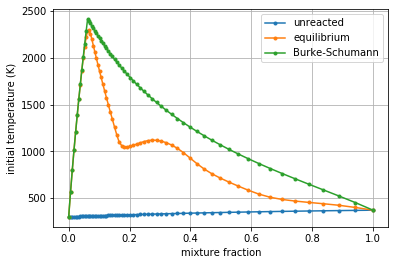
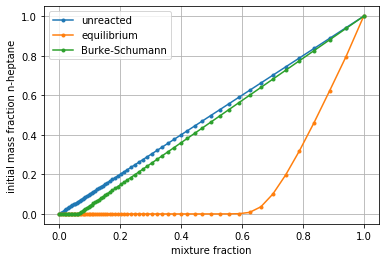
Note above that we used the “unreacted,”equilibrium,” and
“Burke-Schumann” strings for the initial_condition argument. The
temperature and fuel mass fraction profiles for these special states are
plotted below. An unreacted mixture is only mixed, with linear species
and enthalpy profiles. Equilibrium refers to the state with linear
enthalpy but allowed to reach chemical equilibrium (no effects of
mixing). The Burke-Schumann state is an idealized case of perfect,
irreversible combustion.
for key in ['unreacted', 'equilibrium', 'Burke-Schumann']:
    flamelet = flamelets[key]
    plt.plot(flamelet.mixfrac_grid, flamelet.initial_temperature, '.-', label=key)
plt.legend()
plt.grid()
plt.xlabel('mixture fraction')
plt.ylabel('initial temperature (K)')
plt.show()

for key in ['unreacted', 'equilibrium', 'Burke-Schumann']:
    flamelet = flamelets[key]
    plt.plot(flamelet.mixfrac_grid, flamelet.initial_mass_fraction('NXC7H16'), '.-', label=key)
plt.legend()
plt.grid()
plt.xlabel('mixture fraction')
plt.ylabel('initial mass fraction n-heptane')
plt.show()
2.7.4. The Grid
Carefully note in the above plots how the distribution of the grid points is not uniform. When specifying only the number of grid points, a clustered grid that focuses grid points near the stoichiometric mixture fraction is made.
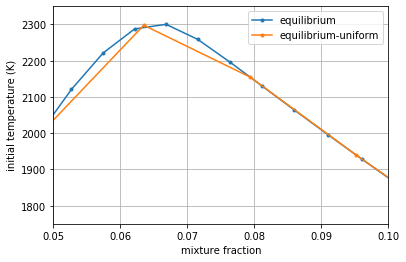
Below we specify the grid_type to be “uniform” instead of
“clustered” (the default value) and build another equilibrium flamelet.
Zooming in near the stoichiometric point with the highest curvature in
the temperature shows how the uniform grid misses this curvature. In
rare cases when dynamics in very rich mixtures are relevant, a uniform
grid ends up being the most efficient option, but most often the
clustered grid is far superior.
flamelets['equilibrium-uniform'] = Flamelet(mech_spec=mech,
                                            initial_condition='equilibrium',
                                            oxy_stream=air,fuel_stream=fuel,
                                            grid_points=64,
                                            grid_type='uniform')

for key in ['equilibrium', 'equilibrium-uniform']:
    flamelet = flamelets[key]
    plt.plot(flamelet.mixfrac_grid, flamelet.initial_temperature, '.-', label=key)
plt.legend()
plt.grid()
plt.xlabel('mixture fraction')
plt.ylabel('initial temperature (K)')
plt.xlim([0.05, 0.1])
plt.ylim([1750, 2350])
plt.show()
2.7.5. Getting a Steady Flamelet at Finite Dissipation
In the Flamelet instances above, we avoided specifying the scalar
dissipation rate, which leads to it being zero. To incorporate molecular
mixing, the dissipation rate can be specified a few ways: -
max_dissipation_rate or stoich_dissipation_rate, along with
dissipation_rate_form as either “constant” or “Peters” (the default)
to use a specified functional form of the dissipation rate -
dissipation_rate to directly provide an array of values
flamelets['eq-Peters-st10Hz'] = Flamelet(FlameletSpec(mech_spec=mech,
                                                      initial_condition='equilibrium',
                                                      oxy_stream=air,
                                                      fuel_stream=fuel,
                                                      grid_points=64,
                                                      stoich_dissipation_rate=10.0))
flamelets['eq-Peters-max10Hz'] = Flamelet(FlameletSpec(mech_spec=mech,
                                                       initial_condition='equilibrium',
                                                       oxy_stream=air,
                                                       fuel_stream=fuel,
                                                       grid_points=64,
                                                       max_dissipation_rate=10.0))
flamelets['eq-constant-10Hz'] = Flamelet(FlameletSpec(mech_spec=mech,
                                                      initial_condition='equilibrium',
                                                      oxy_stream=air,
                                                      fuel_stream=fuel,
                                                      grid_points=64,
                                                      stoich_dissipation_rate=10.0,
                                                      dissipation_rate_form='constant'))
flamelets['eq-constant-10Hz-array'] = Flamelet(FlameletSpec(mech_spec=mech,
                                                            initial_condition='equilibrium',
                                                            oxy_stream=air,
                                                            fuel_stream=fuel,
                                                            grid_points=64,
                                                            dissipation_rate=10.0 * np.ones(64)))
2.7.5.1. The compute_steady_state() Method
Now that we have flamelets with dissipation, the
compute_steady_state() method can be used to compute the steady
temperature and mass fraction profiles that represent the balance
between molecular mixing and combustion chemistry. After calling this
method, the current_* properties for temperature, mass fractions,
etc. of the flamelet can be accessed.
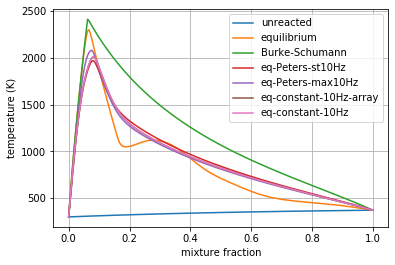
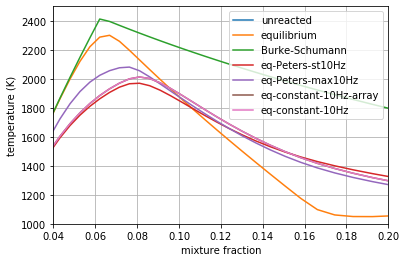
In the following plots (the second simply zooms in on the first), you can see the effect of dissipation, mostly to smooth out the equilibrium profile as chemistry is balanced by mixing.
for key in ['eq-Peters-st10Hz', 'eq-Peters-max10Hz', 'eq-constant-10Hz-array', 'eq-constant-10Hz']:
    flamelets[key].compute_steady_state()


for key in ['unreacted', 'equilibrium', 'Burke-Schumann'] + \
           ['eq-Peters-st10Hz', 'eq-Peters-max10Hz', 'eq-constant-10Hz-array', 'eq-constant-10Hz']:
    flamelet = flamelets[key]
    plt.plot(flamelet.mixfrac_grid, flamelet.current_temperature, label=key)
plt.legend()
plt.grid()
plt.xlabel('mixture fraction')
plt.ylabel('temperature (K)')
plt.show()

for key in ['unreacted', 'equilibrium', 'Burke-Schumann'] + \
           ['eq-Peters-st10Hz', 'eq-Peters-max10Hz', 'eq-constant-10Hz-array', 'eq-constant-10Hz']:
    flamelet = flamelets[key]
    plt.plot(flamelet.mixfrac_grid, flamelet.current_temperature, label=key)
plt.legend()
plt.grid()
plt.xlabel('mixture fraction')
plt.ylabel('temperature (K)')
plt.xlim([0.04, 0.2])
plt.ylim([1000, 2500])
plt.show()
2.7.6. Transient Extinction
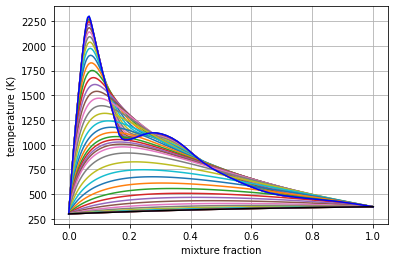
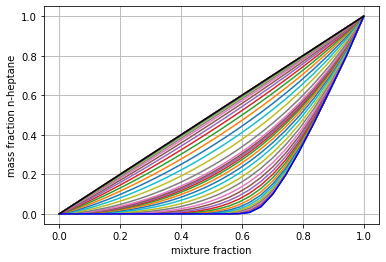
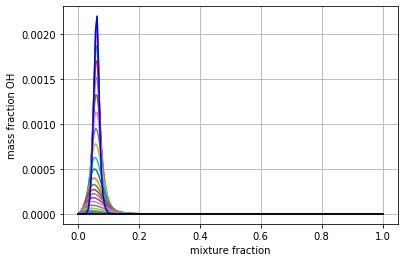
Now we’re going to solve the transient flamelet equations to look in detail at strain-induced extinction of a flamelet initially at chemical equilibrium. The plots below show the transition from the equilibrium profiles to the extinguished state.
flamelet = Flamelet(FlameletSpec(mech_spec=mech,
                                 initial_condition='equilibrium',
                                 oxy_stream=air,
                                 fuel_stream=fuel,
                                 grid_points=64,
                                 stoich_dissipation_rate=1.e3))

output = flamelet.integrate_to_steady(write_log=True, first_time_step=1e-9)
 2021-02-25 13:09 : Spitfire running case with method: Kennedy/Carpenter ESDIRK64

|number of  | simulation | time step  | diff. eqn. | total cpu  | cput per |
|time steps | time (s)   | size (s)   | |residual| | time (s)   | step (ms)|
---------------------------------------------------------------------------|
| 100       | 9.26e-07   | 2.95e-08   | 2.60e+05   | 1.88e+00   | 1.88e+01 |
| 200       | 9.78e-06   | 1.49e-07   | 4.83e+04   | 4.21e+00   | 2.10e+01 |
| 300       | 3.22e-05   | 5.43e-07   | 1.35e+04   | 7.21e+00   | 2.40e+01 |
| 400       | 1.58e-04   | 2.70e-06   | 1.67e+02   | 1.03e+01   | 2.58e+01 |

Integration successfully completed!

Statistics:
- number of time steps : 446
- final simulation time: 0.000587475337460484
- smallest time step   : 1e-09
- average time step    : 1.3172092768172287e-06
- largest time step    : 3.73510924976309e-05

  CPU time
- total    (s) : 1.152887e+01
- per step (ms): 2.584949e+01

  Nonlinear iterations
- total   : 11480
- per step: 25.7

  Linear iterations
- total     : 11480
- per step  : 25.7
- per nliter: 1.0

  Jacobian setups
- total     : 156
- steps per : 2.9
- nliter per: 73.6
- liter per : 73.6

 2021-02-25 13:09 : Spitfire finished in 1.15288734e+01 seconds!
plt.plot(output.mixture_fraction_values, output['temperature'].T[:, ::10])
plt.plot(output.mixture_fraction_values, output['temperature'].T[:, 0], 'b-')
plt.plot(output.mixture_fraction_values, output['temperature'].T[:, -1], 'k-')
plt.grid()
plt.xlabel('mixture fraction')
plt.ylabel('temperature (K)')
plt.show()

plt.plot(output.mixture_fraction_values, output['mass fraction NXC7H16'].T[:, ::10])
plt.plot(output.mixture_fraction_values, output['mass fraction NXC7H16'].T[:, 0], 'b-')
plt.plot(output.mixture_fraction_values, output['mass fraction NXC7H16'].T[:, -1], 'k-')
plt.grid()
plt.xlabel('mixture fraction')
plt.ylabel('mass fraction n-heptane')
plt.show()


plt.plot(output.mixture_fraction_values, output['mass fraction OH'].T[:, ::10])
plt.plot(output.mixture_fraction_values, output['mass fraction OH'].T[:, 0], 'b-')
plt.plot(output.mixture_fraction_values, output['mass fraction OH'].T[:, -1], 'k-')
plt.grid()
plt.xlabel('mixture fraction')
plt.ylabel('mass fraction OH')
plt.show()
2.7.7. Parameter Continuation, Transient Extinction, and Progress Variable Tabulation
Now we combine the main ideas from this notebook to generate a steady
and transient extinction trajectory for our n-heptane/air mixture. We’ll
do parameter continuation in the stoichiometric dissipation rate until
we get near extinction, and then we’ll jump the dissipation rate and
capture the transient extinction event. Building atop this, we’ll
transform the steady and transient libraries into a single library built
atop the mixture fraction and the stoichiometric value of a progress
variable chosen as the mass fraction of CO2. This requires the source
term of CO2, which we compute with Cantera, leveraging Spitfire’s
get_ct_solution_array() method.
Below the slfm_lib variable is made one value of
\(\chi_{\rm st}\) at a time. As with standard SLFM, the extinction
dynamics are not included in the table.
chi_values = np.logspace(-3, 2, 17)
fs0 = FlameletSpec(mech_spec=mech,
                   initial_condition='equilibrium',
                   oxy_stream=air,
                   fuel_stream=fuel,
                   grid_points=64,
                   stoich_dissipation_rate=chi_values[0])
z_values = Flamelet(fs0).mixfrac_grid

slfm_lib = Library(Dimension('mixture_fraction', z_values),
                   Dimension('dissipation_rate_stoich', chi_values, log_scaled=True))
slfm_lib['temperature'] = slfm_lib.get_empty_dataset()
slfm_lib['pressure'] = slfm_lib.get_empty_dataset()
for s in mech.species_names:
    slfm_lib[f'mass fraction {s}'] = slfm_lib.get_empty_dataset()
slfm_lib.extra_attributes['mech_spec'] = mech

print(f'{"chi_st (Hz)":>12} | {"T_max (K)":<12}')
print('-' * 27)

for idx, chi_st in enumerate(chi_values):

    fs = fs0 if idx == 0 else FlameletSpec(library_slice=steady_lib, stoich_dissipation_rate=chi_st)
    f = Flamelet(fs)
    steady_lib = f.compute_steady_state()

    print(f'{chi_st:>12.1e} | {steady_lib["temperature"].max():<12.1f}')

    for prop in steady_lib.props:
        slfm_lib[prop][:, idx] = steady_lib[prop]
print('-' * 27)

fse = FlameletSpec(library_slice=slfm_lib[:, -1], stoich_dissipation_rate=chi_values[-1] * 10.)
fext = Flamelet(fse)

ext_lib = fext.integrate_to_steady(write_log=True)
 chi_st (Hz) | T_max (K)
---------------------------
     1.0e-03 | 2237.9
     2.1e-03 | 2233.3
     4.2e-03 | 2225.9
     8.7e-03 | 2215.1
     1.8e-02 | 2200.7
     3.7e-02 | 2182.8
     7.5e-02 | 2161.6
     1.5e-01 | 2138.5
     3.2e-01 | 2117.9
     6.5e-01 | 2092.6
     1.3e+00 | 2069.1
     2.7e+00 | 2038.9
     5.6e+00 | 2001.7
     1.2e+01 | 1961.1
     2.4e+01 | 1910.2
     4.9e+01 | 1840.0
     1.0e+02 | 1729.9
---------------------------

 2021-02-25 13:09 : Spitfire running case with method: Kennedy/Carpenter ESDIRK64

|number of  | simulation | time step  | diff. eqn. | total cpu  | cput per |
|time steps | time (s)   | size (s)   | |residual| | time (s)   | step (ms)|
---------------------------------------------------------------------------|
| 100       | 9.69e-06   | 1.28e-07   | 4.25e+04   | 2.52e+00   | 2.52e+01 |
| 200       | 2.29e-05   | 4.89e-07   | 1.95e+04   | 4.51e+00   | 2.25e+01 |
| 300       | 1.22e-04   | 1.95e-06   | 6.35e+02   | 7.60e+00   | 2.53e+01 |

Integration successfully completed!

Statistics:
- number of time steps : 363
- final simulation time: 0.0006048045588230816
- smallest time step   : 2.5051492225523748e-08
- average time step    : 1.6661282612206103e-06
- largest time step    : 3.877850229434712e-05

  CPU time
- total    (s) : 9.151398e+00
- per step (ms): 2.521046e+01

  Nonlinear iterations
- total   : 10054
- per step: 27.7

  Linear iterations
- total     : 10054
- per step  : 27.7
- per nliter: 1.0

  Jacobian setups
- total     : 195
- steps per : 1.9
- nliter per: 51.6
- liter per : 51.6

 2021-02-25 13:09 : Spitfire finished in 9.15139817e+00 seconds!
plt.plot(slfm_lib.mixture_fraction_values, slfm_lib['temperature'], 'b')
plt.plot(ext_lib.mixture_fraction_values, ext_lib['temperature'].T[:, ::18], 'c')
plt.grid()
plt.xlabel('mixture fraction')
plt.ylabel('temperature (K)')
plt.show()
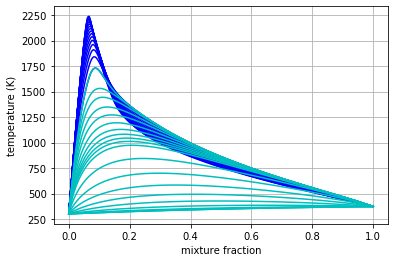
To combine the libraries and prepare for progress variable identification, we first simply map onto \(\chi_{\rm st}(1+t)\), where \(t\) is the extinction time, for the second dimension to ensure uniqueness.
t_step = 18  # just to reduce the data size a little
t_values_step = ext_lib.time_values[1::t_step]
chi_opt = np.hstack((chi_values, chi_values[-1] *(1. + t_values_step)))

combined_lib = Library(Dimension('mixture_fraction', z_values), Dimension('chi_opt', chi_opt))

for prop in slfm_lib.props:
    combined_lib[prop] = combined_lib.get_empty_dataset()
    combined_lib[prop][:, :chi_values.size] = slfm_lib[prop][:, :chi_values.size]
    combined_lib[prop][:, chi_values.size:] = ext_lib[prop][1::t_step, :].T

plt.plot(combined_lib.mixture_fraction_values, combined_lib['temperature'], 'g')
plt.grid()
plt.xlabel('mixture fraction')
plt.ylabel('temperature (K)')
plt.show()
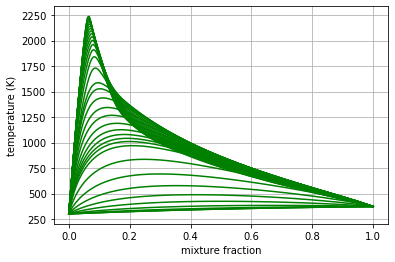
Now we build one-dimensional interpolation to compute stoichiometric values of every tabulated property over the combined second dimension. These will be used to define a progress variable.
from scipy.interpolate import interp1d

stoich_values = Library(Dimension('chi_opt', chi_opt))
z_st = mech.stoich_mixture_fraction(fuel, air)

for prop in combined_lib.props:
    stoich_values[prop] = stoich_values.get_empty_dataset()
    stoich_values[prop] = interp1d(combined_lib.mixture_fraction_values,
                                   combined_lib[prop],
                                   axis=0)(z_st)
for s in ['CO2', 'H2O', 'CO']:
    plt.plot(stoich_values[f'temperature'], stoich_values[f'mass fraction {s}'], label=s)
plt.grid()
plt.xlabel('stoich. temperature (K)')
plt.ylabel('stoich. mass fraction')
plt.legend()
plt.show()
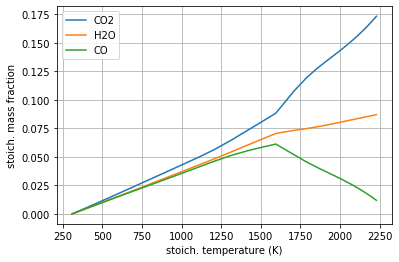
The above shows that CO2 and H2O, unlike CO, are admissible progress variables as they vary monotonically from the high-temperature equilibrium state to the extinguished state. Linear combinations of mass fractions could be employed, but here we’ll keep things simple and just use CO2.
Y_CO2_st = stoich_values[f'mass fraction CO2']
Y_CO2_st_scaled = (Y_CO2_st - Y_CO2_st.min()) / (Y_CO2_st.max() - Y_CO2_st.min())

progvar_lib = Library(Dimension('mixture_fraction', z_values),
                      Dimension('scaled_st_Y_CO2', Y_CO2_st_scaled))

for prop in combined_lib.props:
    progvar_lib[prop] = combined_lib[prop]
plt.contourf(progvar_lib.mixture_fraction_grid,
             progvar_lib.scaled_st_Y_CO2_grid,
             progvar_lib['temperature'],
             cmap='afmhot')
plt.xlabel('$Z$')
plt.ylabel('$C_{\\rm st}$')
plt.colorbar()
plt.show()
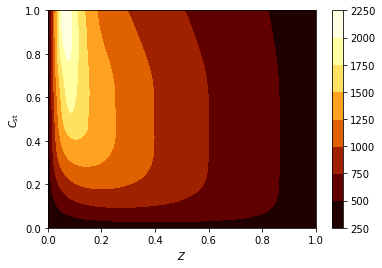
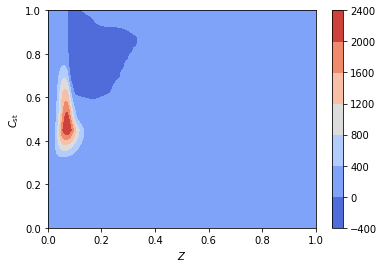
A requirement for the FPV tabulation is to tabulate the source term of
the progress variable. While Spitfire computes chemical source terms and
much more in order to solve flamelet problems, the most convenient way
of getting reaction rates and other thermochemical properties is to use
Cantera. For this, get_ct_solution_array, which takes a mechanism
and library, can be used to obtain a SolutionArray object from
Cantera which acts like a single thermochemical state but loops over a
large number behind the scenes. So we can simply call
net_production_rates to get the molar species production rates, and
then reshape them into the library.
ct_array, lib_shape = get_ct_solution_array(mech, progvar_lib)

co2_idx = mech.species_index('CO2')
co2_mw = mech.molecular_weight('CO2')

progvar_lib['prod rate CO2'] = co2_mw * ct_array.net_production_rates[:, co2_idx].reshape(lib_shape)
progvar_lib['C source'] = progvar_lib['prod rate CO2'] / (Y_CO2_st.max() - Y_CO2_st.min())
plt.contourf(progvar_lib.mixture_fraction_grid,
             progvar_lib.scaled_st_Y_CO2_grid,
             progvar_lib['C source'],
             cmap='coolwarm')
plt.colorbar()
plt.xlabel('$Z$')
plt.ylabel('$C_{\\rm st}$')
plt.show()
2.7.8. Conclusions
In this demonstration we’ve covered the basics of specifying a flamelet model with initialization options, dissipation rate forms, and grid types. Following this we solved the steady and transient flamelet equations, ultimately performing parameter continuation to build an SLFM library, and combined with a transient extinction calculation to build an FPV library.